

28: MECHANICAL SYSTEM REPLACEMENT (MECHANICS SUBSTITUTION, Another Sense, Replacement of Mechanical System): (A) Replace a mechanical means with an optical, acoustical, thermal or olfactory system i.e. sensory means (visual, acoustic, touch, taste, smell), (B) Introduce or use a field (electric, magnetic or electromagnetic etc) inside or to interact with an object (or system), (C) Replace field that is stationary with mobile or fixed with varying with time or random with structured, (E) Use fields in conjunction with field activated (e.g. ferromagnetic) objects (or systems)
EXAMPLE: Color Code based part identification and assembling, use smell or visible compound/gas to detect a leakage instead of a mechanical or electrical sensor, Field Activated Switches, Mixing Two Powdered Particles (charging each with electro-statically opposite charges), MRI Scanners, Thermoplastic Metal Coating in Electromagnetic Field, Acoustic Fencing.
SYNONYMS: MECHANICS SUBSTITUTION, Another Sense, Replacement of a Mechanical System, Replace force with subtlety
ACB:
“Mechanical Substitution” involves replacing traditional mechanical components or actions with alternative non-mechanical elements or processes to achieve the desired functionality or overcome contradictions. This principle encourages engineers and innovators to explore solutions beyond conventional mechanical approaches. Replace or substitute traditional mechanical elements or actions with non-mechanical alternatives to achieve the same or improved functionality and overcome contradictions. Traditional mechanical components may contribute to contradictions such as complexity, wear, or maintenance issues. Identify non-mechanical alternatives, such as using magnetic, electrical, pneumatic, or other principles to achieve the same or improved functionality while addressing the contradictions. Users prefer wireless headphones for freedom of movement, as they face challenges with tangled cables when using separate headphones and microphones. Wireless headphones with integrated microphone and speaker components provide freedom of movement without the hassle of managing cables.
Explore alternatives like magnetic levitation, air bearings, or non-contact technologies to replace traditional mechanical components, reducing wear and friction. Consider using non-mechanical components, sensors, or electronic controls to simplify the design and assembly, while maintaining or improving functionality. Introduce non-mechanical precision technologies, such as laser systems, optical sensors, or electronic control systems, to enhance precision without relying solely on traditional mechanical components. Explore non-mechanical alternatives like piezoelectric actuators, electromagnetic systems, or smart materials to improve efficiency and address energy-related contradictions. Investigate non-mechanical alternatives, including advanced materials, smart structures, or miniaturized electronic components, to achieve the desired functionality with reduced weight and size. The Mechanical Substitution Principle encourages creative thinking by looking beyond conventional mechanical solutions and considering innovative alternatives from various domains of science and engineering. This approach can lead to more efficient, reliable, and elegant solutions to engineering challenges.
The “Mechanical Substitution” involves replacing a solid structure with a flexible or deformable one. This substitution can lead to improved performance, increased adaptability, or enhanced functionality. Use of flexible materials and hydraulic systems for shock absorbers, allowing better adaptation to road irregularities. Implementation of foldable designs with flexible joints, allowing for easy portability and storage. Introduction of flexible and expandable hoses that can stretch when water pressure is applied and contract when not in use. Integration of accordion-like bellows made of flexible material to allow movement and absorb vibrations. Development of flexible PCBs using flexible materials like polyimide, enabling them to conform to curved surfaces or fit into tight spaces. Introduction of soft robotics grippers made of flexible materials, allowing safer interaction with delicate objects and adapting to various shapes. Use of flexible and dynamic mechanical seals that adjust to variations in shaft movements, reducing wear and improving efficiency. Implementation of expandable bellows made of flexible materials to absorb thermal expansion or contraction in pipes. Integration of artificial muscles or soft actuators that mimic the flexibility and adaptability of natural muscles.Rigid glass screens on smartphones. Introduction of flexible OLED displays that can bend or fold, allowing for innovative device designs. The mechanics substitution principle emphasizes the advantages of incorporating flexibility and adaptability into mechanical systems, resulting in improved performance and expanded functionality.
LIDAR (Light Detection and Ranging) and similar technologies use laser or infrared (IR) light to measure distances with precision and efficiency. Unlike a traditional measuring tape, which relies on physical contact, these technologies utilize the principles of light reflection and time-of-flight to determine distances. LIDAR devices emit a laser beam or infrared light toward a target area. The emitted light interacts with objects in its path. Some of the light reflects off these objects and returns toward the LIDAR sensor. The LIDAR sensor measures the time it takes for the emitted light to travel to the object and back (time-of-flight). By knowing the speed of light, the sensor calculates the distance based on the time it took for the light to make the round trip. The returning light is detected by a sensor, and the device analyzes the time-of-flight data. Using the calculated time-of-flight, the LIDAR system determines the precise distance to the object or surface that reflected the light. In applications such as mapping or surveying, multiple distance measurements are taken from different angles. The collected distance data is used to generate a point cloud or a 3D map of the scanned area. LIDAR technology is widely used in various fields, including remote sensing, autonomous vehicles, robotics, geospatial mapping, forestry, and more. Its ability to provide accurate and real-time distance measurements, often in 3D, makes it valuable for applications where precise spatial information is crucial.
The concept of “mechanical substitution” in generally refers to replacing a physical, mechanical component or action with a different, non-mechanical solution. In the case of an e-book, while it might not directly involve a mechanical component, it represents a form of substitution in the context of information delivery and reading experience. Traditional printed books involve the physical mechanics of paper, ink, and binding. The introduction of e-books substitutes these physical elements with digital technology. The mechanics of turning physical pages are replaced by digital mechanisms such as swiping or tapping on a screen. The substitution involves a shift from a mechanical, tangible medium to a digital, electronic one.
LASIK (Laser-Assisted In Situ Keratomileusis) is a surgical procedure designed to correct refractive errors in the eye, such as myopia (nearsightedness), hyperopia (farsightedness), and astigmatism. By reshaping the cornea, LASIK can improve vision and reduce or eliminate the need for glasses or contact lenses. By reshaping the cornea, LASIK allows light to be focused directly onto the retina, resulting in clearer vision. LASIK aims to reduce or eliminate dependence on glasses or contact lenses for distance vision. After successful LASIK surgery, many individuals experience improved vision without the need for corrective lenses.
Sound-operated switches use sound waves to trigger electrical responses. When a specific sound threshold is reached, the switch activates or deactivates. Offers a hands-free and potentially more accessible way to operate devices. Eliminates the need for physical touch, addressing concerns related to hygiene and convenience. Digital styluses interact with touch-sensitive LED screens, allowing users to write, draw, or interact with the digital content. Provides a precise input method on touchscreens, combining the advantages of digital technology with the feel of traditional writing instruments. Wireless chargers use electromagnetic fields to transfer energy between the charging pad and the device, eliminating the need for physical cables. Offers convenience by reducing clutter and the hassle of dealing with wires. Addresses concerns related to ease of charging and portability.
Laser pointers have become popular replacements for traditional stick-based pointers in classrooms and presentations due to several advantages. A laser pointer contains a small laser diode that emits a concentrated beam of light when electrical current is applied to it. The emitted light undergoes collimation, a process that aligns the light waves to travel in parallel, creating a focused and coherent beam. The collimated light beam may be directed using mirrors or lenses to control the direction of the laser light. Laser pointers produce a highly visible and bright dot of light, making it easily noticeable even in well-lit rooms or when projecting on screens. Traditional stick-based pointers may have limitations in brightness and visibility.
Laser pointers are versatile and can be used for pointing at various distances, from close-up presentations to large auditoriums. Traditional pointers may have limitations in range and effectiveness in larger spaces. Laser pointers offer precision in pointing to specific details or objects, making them ideal for detailed presentations or educational purposes. Traditional pointers may lack the accuracy and precision provided by laser pointers. Laser pointers can have a longer effective range, allowing presenters to engage with their audience from a distance. Traditional pointers may require the presenter to be closer to the screen or whiteboard. Laser pointers allow for the adjustment of focus, enabling presenters to control the size of the projected dot or line.Traditional pointers typically have a fixed size and may lack focus control. Laser pointers are often seen as more modern and professional in appearance compared to traditional stick pointers. The sleek and compact design of laser pointers adds to their appeal.
Face recognition systems are employed for automatic attendance management by utilizing advanced facial recognition technology. Initially, individuals need to be enrolled in the system. During this process, their facial features are captured and stored in a database. The system analyzes and creates a unique template based on various facial characteristics, such as the distance between the eyes, the shape of the nose, and other distinguishable features. When attendance is required, the system captures the facial image of individuals using cameras or other imaging devices. The captured image is then compared with the stored templates in the database. Advanced facial recognition algorithms, often based on deep learning and artificial intelligence, are used to match the captured image with the stored templates. These algorithms can identify and analyze facial features with high accuracy, making them effective for recognition purposes. If a match is found between the captured image and a template in the database, the individual is marked as present. The attendance data is automatically recorded in the system. Many face recognition systems operate in real-time, allowing for quick and efficient attendance tracking without manual intervention.
Face recognition systems offer high accuracy in identifying individuals, reducing the chances of errors in attendance records. The process is quick and automated, saving time compared to manual or mechanical attendance methods. Face recognition is a contactless technology, which is particularly relevant in situations where hygiene and safety are priorities. These systems often incorporate security measures to protect the stored facial templates, ensuring the privacy and security of individuals’ biometric data. Overall, face recognition systems provide a modern and efficient solution for attendance management in various settings, such as workplaces, educational institutions, and events.
Brainsketching is an idea of visually sketching or drawing to stimulate and express ideas related to brainstorming or creative thinking. Brain sketching could involve the use of visual elements, such as drawings, diagrams, or mind maps, to brainstorm and organize ideas. This visual representation can help individuals see connections and patterns in a more tangible way. Doodling or sketching can be a creative and spontaneous activity that allows individuals to explore ideas freely. Sometimes, ideas flow more easily when expressed visually rather than in written form. Creating visual concept maps or sketches to illustrate relationships between different concepts or components. This can aid in understanding complex topics and generating new ideas. If applied in a narrative or sequential context, “brain sketching” might involve creating storyboards—visual sequences of images—to outline a process, user experience, or story. Leveraging visual thinking techniques to solve problems or communicate ideas. This could involve using sketches, diagrams, or other visual representations to enhance cognitive processes. Creating mind maps to visually organize and represent ideas, concepts, or relationships. Mind maps often use keywords, colors, and simple sketches to convey information in a non-linear format. This approach align with the idea of using visual elements to enhance creativity, idea generation, and problem-solving. The field of visual thinking encompasses various techniques that leverage the power of images and sketches to enhance cognitive processes and communication.
There is a problem-solving technique known as the “excursion method.” This method is designed to be used in a group setting when other problem-solving methods have failed, especially in situations where a radical solution is needed for a narrowly scoped problem. The excursion method combines visualization and analogy methods to stimulate creative thinking. The process consists of the following four steps:
(1) The group leader outlines the problem to be solved and then selects a location for a real or imaginary excursion (e.g., a mountain road, a railway journey, or a journey through space). (2) Each group member closes their eyes and spends about ten minutes going on a private visual journey in the chosen location. (3) Participants examine everything on their excursion in detail and document on paper what they have seen during the excursion. (4) Each group member identifies analogies between the images noted on their excursion sheets and the problem at hand. Analogies are connections or similarities between elements observed during the excursion and aspects of the problem. (5) Each group participant evaluates the practical use of the identified analogies in solving the problem. This step involves considering how the observed elements during the excursion can be applied or adapted to address the problem’s challenges. (6) Each group member shares their ideas with others, starting with the details of their excursion and the analogies they have established. The group as a whole then builds on these ideas to collectively find a workable solution to the problem.
The method encourages a combination of visualization and analogy, leveraging the power of imagination to spark creative thinking. The excursion serves as a metaphorical journey that helps participants break away from traditional thinking patterns. Analogies play a crucial role in connecting elements from the excursion to the problem, providing fresh perspectives. The group interaction in the final step fosters collaboration, allowing diverse ideas to contribute to the development of a comprehensive and innovative solution. This method emphasizes the importance of leveraging imaginative processes and analogical thinking to address challenging problems in a group setting.
There are devices designed to repel rodents, including rats, from vehicles. These devices often use ultrasonic sound waves to deter rodents without causing harm to them or other occupants of the vehicle. These devices emit ultrasonic sound waves at frequencies that are unpleasant for rodents but generally imperceptible to humans. The frequencies used are often in the ultrasonic range, typically above 20,000 hertz. Rodents, including rats, have sensitive hearing and are more susceptible to high-frequency sounds. The emitted ultrasonic waves are irritating to them, creating a hostile environment. Ultrasonic repellent devices are designed to be non-harmful and non-lethal. They aim to repel rodents rather than harm them. The goal is to encourage rodents to leave the area without causing them distress. Some devices operate continuously, emitting ultrasonic waves consistently. Others may operate intermittently (periodic action) to prevent rodents from getting accustomed to a constant sound. Many of these devices are designed for easy installation in vehicles. They may come in the form of small units that can be placed in the engine compartment or other areas where rodents are likely to enter. Some devices are battery-powered, while others may connect to the vehicle’s electrical system. They are often designed to have minimal impact on the vehicle’s battery. The effectiveness of ultrasonic rodent repellent devices can vary. While some users report success in keeping rodents away, results may depend on factors such as the severity of the rodent problem, the specific device used, and the environment.
T”Parking Sensors” or “Collision Avoidance System” in cars use various sensors to detect the proximity of nearby objects and provide alerts to the driver to avoid collisions. Cars equipped with parking sensors have ultrasonic sensors installed in the front and/or rear bumpers. These sensors emit ultrasonic waves (sound waves with frequencies above the human hearing range) and detect the reflections or echoes when the waves hit an object. By measuring the time taken for the ultrasonic waves to travel to the object and back, the system calculates the distance between the car and the obstacle. If the system determines that the car is approaching an obstacle too closely, it activates an alert. This alert is often an audible beep or series of beeps that increase in frequency as the distance to the obstacle decreases. Some systems also include a visual display on the dashboard, indicating the distance to the nearest obstacle. The display may show a graphical representation of the car and the surrounding objects.
Some advanced collision avoidance systems use radar sensors to detect objects around the vehicle. Radar works by sending radio waves and measuring their reflections. Some vehicles are equipped with cameras that provide a visual feed to the driver. Advanced image processing algorithms can analyze the video feed to detect obstacles and provide alerts. In some high-end vehicles, lidar (light detection and ranging) sensors are used. Lidar uses laser beams to measure distances accurately. Parking sensors and collision avoidance systems help drivers navigate tight spaces, park more easily, and avoid collisions with obstacles, pedestrians, or other vehicles. Drivers should still exercise caution and use their mirrors and other visual cues when driving or parking. While these systems are helpful, they are not a substitute for careful driving practices. These technologies contribute to enhanced safety and can be particularly useful in urban environments and parking lots where close-quarters maneuvering is required.
The Google Effect bias, also known as digital amnesia or the external memory effect, refers to the tendency to rely on external sources of information, such as the internet and search engines like Google, to retrieve and store information instead of relying on internal memory processes. This bias arises from the convenience and accessibility of online information, which can lead individuals to offload cognitive tasks to digital devices rather than committing information to memory. In technical systems design, the Google Effect bias can manifest in various ways, particularly in the design of user interfaces and information retrieval systems. For example: Search engines like Google are designed to provide users with quick access to vast amounts of information. The design of search engine interfaces, including features such as autocomplete suggestions, search history, and personalized recommendations, caters to users’ desire for instant access to information without the need to memorize specific details.
Virtual assistants and smart devices leverage the Google Effect bias by offering users the ability to retrieve informaion, set reminders, and perform tasks through voice commands or text input. These systems rely on cloud-based services to store and retrieve user data, reducing the need for individuals to memorize information or perform manual tasks. Technical systems often include online documentation, knowledge bases, and help systems that users can access to troubleshoot issues, learn new features, or find answers to questions. By providing comprehensive and searchable resources, these systems empower users to rely on external sources of information rather than memorizing technical details.
While the Google Effect bias can enhance efficiency and productivity in certain contexts, it also has potential drawbacks, such as over-reliance on external sources of information, decreased memory retention, and susceptibility to misinformation or cognitive biases. Designers of technical systems should consider the impact of the Google Effect bias on user behavior and cognition when designing interfaces, information retrieval mechanisms, and support systems. Striking a balance between providing access to external information and encouraging cognitive engagement and memory retention is essential for designing effective and user-friendly technical systems.
One practical example of a system that leverages the vast information available, akin to the Google Effect, is Amazon’s recommendation system. Amazon employs sophisticated algorithms to analyze user behavior, purchase history, and product interactions to generate personalized recommendations for each user. When users browse or purchase products on Amazon, the recommendation system analyzes their behavior and preferences to suggest additional items that they may be interested in. These recommendations appear prominently on the website, in email newsletters, and during the checkout process.
The digital systems in cars solve various problems and contradictions associated with driving, such as navigation challenges, entertainment needs, safety concerns, and the desire for connectivity on the go. By integrating advanced technology, communication systems, and internet connectivity, modern cars offer a seamless and enjoyable driving experience while addressing the diverse needs and preferences of drivers and passengers.
In modern cars, the integration of digital systems with communication technology and internet connectivity has revolutionized the driving experience, offering a wide range of features for entertainment, navigation, safety, and connectivity. Entertainment Systems: Many cars are equipped with infotainment systems that offer a variety of entertainment options, including streaming music, radio, podcasts, and audiobooks. These systems often have touchscreen displays or voice controls for easy access to content, providing entertainment for passengers during long journeys and reducing driver fatigue. Navigation Systems: Built-in navigation systems use GPS technology to provide real-time directions and route guidance to drivers. They offer features such as turn-by-turn navigation, traffic updates, and points of interest along the route. By helping drivers find the most efficient routes and avoid traffic congestion, navigation systems save time and reduce stress during travel. Safety and Assistance Features: Some cars are equipped with advanced driver assistance systems (ADAS) that use sensors, cameras, and radar to enhance safety on the road. These systems may include features such as lane departure warning, adaptive cruise control, automatic emergency braking, and blind-spot monitoring, helping drivers avoid accidents and collisions.
Connected Services: Many modern cars are equipped with internet connectivity, allowing them to access a wide range of online services and features. This connectivity enables features such as real-time weather updates, local search, remote vehicle monitoring and control (e.g., locking/unlocking doors, starting the engine), and over-the-air software updates. By keeping drivers connected and informed, these features enhance convenience and peace of mind while on the road. Data Capture and Analysis: Some cars are equipped with onboard cameras and sensors that capture data about the vehicle’s surroundings and driving behavior. This data can be used for various purposes, such as recording accidents or incidents, monitoring driver behavior (e.g., for insurance purposes), and analyzing vehicle performance and efficiency. By providing valuable insights into driving habits and vehicle health, data capture systems help drivers make informed decisions and improve overall safety and efficiency.
1: Mass of the moving object: [‘7: Volume of the moving object’, ’14: Strength’, ’25: Time loss’, ’28: Accuracy of measurement’, ’29: Accuracy of manufacturing’, ’32: Convenience of manufacturing’, ’34: Convenience of repair’, ’37: Complexity of control and measurement’]
2: Mass of the non-moving object: [’14: Strength’, ’17:Temperature’, ’20: Energy consumption of the non-moving object’, ’22: Energy loss’, ’27: Reliability’, ’28: Accuracy of measurement’, ’32: Convenience of manufacturing’, ’34: Convenience of repair’, ’37: Complexity of control and measurement’, ’39: Productivity’]
3: Length of the moving object: [’28: Accuracy of measurement’, ’29: Accuracy of manufacturing’, ’34: Convenience of repair’, ’39: Productivity’]
4: Length of the non-moving object: [‘2: Mass of the non-moving object’, ’10: Force’, ’14: Strength’, ’22: Energy loss’, ’23: Material loss’, ’27: Reliability’, ’28: Accuracy of measurement’]
5: Area of the moving object: [’11: Tension, Pressure’, ’28: Accuracy of measurement’, ’30: Harmful external factors’, ’38: Level of automation’]
6: Area of the non-moving object: [’28: Accuracy of measurement’]
7: Volume of the moving object: [’13: Stability of the object’, ’28: Accuracy of measurement’, ’29: Accuracy of manufacturing’]
8: Volume of the non-moving object: [’13: Stability of the object’]
9: Speed: [‘1: Mass of the moving object’, ’10: Force’, ’13: Stability of the object’, ’17:Temperature’, ’23: Material loss’, ’27: Reliability’, ’28: Accuracy of measurement’, ’29: Accuracy of manufacturing’, ’30: Harmful external factors’, ’33: Convenience of use’, ’34: Convenience of repair’, ’36: Complexity of the structure’]
10: Force: [‘2: Mass of the non-moving object’, ‘4: Length of the non-moving object’, ‘9: Speed’, ’29: Accuracy of manufacturing’, ’33: Convenience of use’, ’39: Productivity’]
11: Tension, Pressure: [‘5: Area of the moving object’, ’28: Accuracy of measurement’]
12: Shape: [’28: Accuracy of measurement’, ’32: Convenience of manufacturing’, ’36: Complexity of the structure’]
13: Stability of the object: [‘3: Length of the moving object’, ‘7: Volume of the moving object’, ‘8: Volume of the non-moving object’, ‘9: Speed’]
14: Strength: [‘4: Length of the non-moving object’, ‘6: Area of the non-moving object’, ’21: Power’, ’23: Material loss’, ’25: Time loss’, ’36: Complexity of the structure’]
15: Action time of the moving object: [’12: Shape’, ’19: Energy consumption of the moving object’, ’23: Material loss’, ’25: Time loss’, ’30: Harmful external factors’]
16: Action time of the non-moving object: [’25: Time loss’]
17:Temperature: [‘9: Speed’, ’25: Time loss’, ’39: Productivity’]
18: Brightness, Visibility: [’32: Convenience of manufacturing’, ’33: Convenience of use’]
19: Energy consumption of the moving object: [‘1: Mass of the moving object’, ‘3: Length of the moving object’, ’15: Action time of the moving object’, ’32: Convenience of manufacturing’, ’34: Convenience of repair’, ’36: Complexity of the structure’, ’39: Productivity’]
20: Energy consumption of the non-moving object: [’23: Material loss’]
21: Power: [’14: Strength’, ’23: Material loss’, ’38: Level of automation’, ’39: Productivity’]
22: Energy loss: [‘1: Mass of the moving object’, ’39: Productivity’]
23: Material loss: [‘4: Length of the non-moving object’, ‘9: Speed’, ’14: Strength’, ’15: Action time of the moving object’, ’20: Energy consumption of the non-moving object’, ’21: Power’, ’28: Accuracy of measurement’, ’33: Convenience of use’, ’36: Complexity of the structure’, ’39: Productivity’]
24: Information loss: [’25: Time loss’, ’26: Amount of substance’, ’27: Reliability’]
25: Time loss: [’14: Strength’, ’15: Action time of the moving object’, ’16: Action time of the non-moving object’, ’24: Information loss’, ’28: Accuracy of measurement’, ’29: Accuracy of manufacturing’, ’32: Convenience of manufacturing’, ’33: Convenience of use’, ’35: Adaptability’, ’37: Complexity of control and measurement’, ’38: Level of automation’]
26: Amount of substance: [‘9: Speed’, ’24: Information loss’, ’27: Reliability’, ’28: Accuracy of measurement’]
27: Reliability: [‘2: Mass of the non-moving object’, ‘4: Length of the non-moving object’, ‘9: Speed’, ’10: Force’, ’14: Strength’, ’24: Information loss’, ’26: Amount of substance’, ’37: Complexity of control and measurement’]
28: Accuracy of measurement: [‘1: Mass of the moving object’, ‘2: Mass of the non-moving object’, ‘3: Length of the moving object’, ‘4: Length of the non-moving object’, ‘5: Area of the moving object’, ‘6: Area of the non-moving object’, ‘9: Speed’, ’11: Tension, Pressure’, ’12: Shape’, ’14: Strength’, ’15: Action time of the moving object’, ’17:Temperature’, ’23: Material loss’, ’25: Time loss’, ’30: Harmful external factors’, ’37: Complexity of control and measurement’, ’38: Level of automation’, ’39: Productivity’]
29: Accuracy of manufacturing: [‘1: Mass of the moving object’, ‘2: Mass of the non-moving object’, ‘3: Length of the moving object’, ‘5: Area of the moving object’, ‘9: Speed’, ’10: Force’, ’25: Time loss’, ’30: Harmful external factors’, ’38: Level of automation’]
30: Harmful external factors: [‘5: Area of the moving object’, ‘9: Speed’, ’15: Action time of the moving object’, ’28: Accuracy of measurement’, ’29: Accuracy of manufacturing’, ’33: Convenience of use’]
31: Harmful internal factors: [‘9: Speed’, ’10: Force’]
32: Convenience of manufacturing: [‘1: Mass of the moving object’, ’12: Shape’, ’18: Brightness, Visibility’, ’19: Energy consumption of the moving object’, ’25: Time loss’, ’37: Complexity of control and measurement’, ’38: Level of automation’, ’39: Productivity’]
33: Convenience of use: [’10: Force’, ’12: Shape’, ’14: Strength’, ’23: Material loss’, ’25: Time loss’, ’30: Harmful external factors’, ’39: Productivity’]
34: Convenience of repair: [‘3: Length of the moving object’, ’15: Action time of the moving object’, ’19: Energy consumption of the moving object’, ’26: Amount of substance’]
35: Adaptability: [’25: Time loss’, ’36: Complexity of the structure’, ’39: Productivity’]
36: Complexity of the structure: [‘9: Speed’, ’12: Shape’, ’14: Strength’, ’15: Action time of the moving object’, ’19: Energy consumption of the moving object’, ’23: Material loss’, ’35: Adaptability’, ’37: Complexity of control and measurement’, ’39: Productivity’]
37: Complexity of control and measurement: [‘1: Mass of the moving object’, ‘2: Mass of the non-moving object’, ’10: Force’, ’14: Strength’, ’25: Time loss’, ’27: Reliability’, ’28: Accuracy of measurement’, ’30: Harmful external factors’, ’32: Convenience of manufacturing’, ’36: Complexity of the structure’]
38: Level of automation: [‘1: Mass of the moving object’, ‘2: Mass of the non-moving object’, ‘3: Length of the moving object’, ‘9: Speed’, ’21: Power’, ’22: Energy loss’, ’25: Time loss’, ’28: Accuracy of measurement’, ’29: Accuracy of manufacturing’]
39: Productivity: [‘2: Mass of the non-moving object’, ‘3: Length of the moving object’, ’10: Force’, ’14: Strength’, ’17:Temperature’, ’22: Energy loss’, ’23: Material loss’, ’28: Accuracy of measurement’, ’32: Convenience of manufacturing’, ’33: Convenience of use’, ’35: Adaptability’, ’36: Complexity of the structure’]
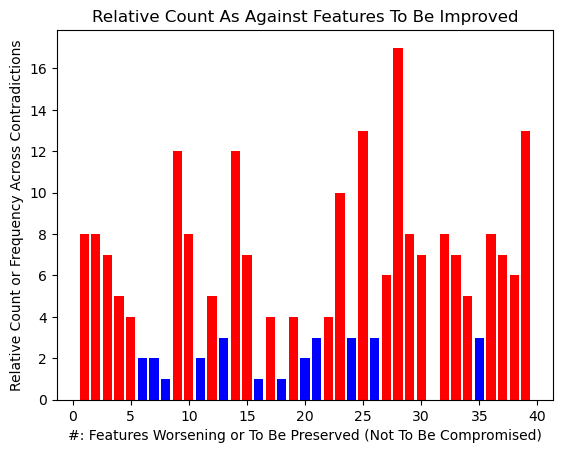
1/7 1/14 1/25 1/28 1/29 1/32 1/34 1/37 2/14 2/17 2/20 2/22 2/27 2/28 2/32 2/34 2/37 2/39 3/28 3/29 3/34 3/39 4/2 4/10 4/14 4/22 4/23 4/27 4/28 5/11 5/28 5/30 5/38 6/28 7/13 7/28 7/29 8/13 9/1 9/10 9/13 9/17 9/23 9/27 9/28 9/29 9/30 9/33 9/34 9/36 10/2 10/4 10/9 10/29 10/33 10/39 11/5 11/28 12/28 12/32 12/36 13/3 13/7 13/8 13/9 14/4 14/6 14/21 14/23 14/25 14/36 15/12 15/19 15/23 15/25 15/30 16/25 17/9 17/25 17/39 18/32 18/33 19/1 19/3 19/15 19/32 19/34 19/36 19/39 20/23 21/14 21/23 21/38 21/39 22/1 22/39 23/4 23/9 23/14 23/15 23/20 23/21 23/28 23/33 23/36 23/39 24/25 24/26 24/27 25/14 25/15 25/16 25/24 25/28 25/29 25/32 25/33 25/35 25/37 25/38 26/9 26/24 26/27 26/28 27/2 27/4 27/9 27/10 27/14 27/24 27/26 27/37 28/1 28/2 28/3 28/4 28/5 28/6 28/9 28/11 28/12 28/14 28/15 28/17 28/23 28/25 28/30 28/37 28/38 28/39 29/1 29/2 29/3 29/5 29/9 29/10 29/25 29/30 29/38 30/5 30/9 30/15 30/28 30/29 30/33 31/9 31/10 32/1 32/12 32/18 32/19 32/25 32/37 32/38 32/39 33/10 33/12 33/14 33/23 33/25 33/30 33/39 34/3 34/15 34/19 34/26 35/25 35/36 35/39 36/9 36/12 36/14 36/15 36/19 36/23 36/35 36/37 36/39 37/1 37/2 37/10 37/14 37/25 37/27 37/28 37/30 37/32 37/36 38/1 38/2 38/3 38/9 38/21 38/22 38/25 38/28 38/29 39/2 39/3 39/10 39/14 39/17 39/22 39/23 39/28 39/32 39/33 39/35 39/36
EXAMPLE: Car keys using infrared (IR). Cars with contactless or keyless entry systems often use a technology known as “Passive Keyless Entry” (PKE) or “Advanced Keyless Entry.” Infrared car key systems use IR signals to communicate between the key fob and the car’s locking system. When you press the button on the key fob, it emits an IR signal that the car’s receiver recognizes, unlocking or locking the doors.
Contradictions (33/30): Eliminates the need for a physical key , providing convenience and faster access (33). It also enhances security by enabling remote locking/unlocking (30).
Solution: The driver is provided with a key fob or smart key, which is equipped with a small radio transmitter and sometimes an RFID (Radio-Frequency Identification) chip. When the driver approaches the vehicle, the car’s onboard computer detects the presence of the key fob within a certain range, typically a few feet from the car. The key fob continuously emits a unique identification code or signal. When the car detects this signal within its range, it initiates an authentication process. The car’s system and the key fob communicate with each other using radio frequency (RF) signals or other wireless technologies. Some systems also use low-frequency signals or NFC (Near Field Communication) technology for proximity detection. If the detected key fob is authenticated and authorized, the car’s doors are automatically unlocked.
Some advanced systems may also provide keyless ignition, allowing the driver to start the car without inserting a physical key into the ignition. In keyless ignition systems, the driver typically presses a button on the dashboard or center console to start the engine. The system verifies the presence and authenticity of the key fob before allowing the engine to start. Advanced encryption and security protocols are often implemented to prevent unauthorized access or signal interception. Some systems may also include additional security features, such as rolling codes, which change the authentication code with each use.