

34: REJECTING AND REGENERATING : (A) Reject (or discard, dissolve, evaporate, melt, disappear, appear to disappear etc) an element of an object (or system) after its intended function is achieved or is rendered useless after an operation, (B) Restore (or recover or regenerate or return etc) used-up parts or its characteristics (directly or indirectly) during an operation. (C) Need based assembling-disassembling or activation or deactivation or onboardig or offloading of a system or part i.e. make use of object (or system) and its characteristics on temporary or interim or need basis as a part of the main system.
EXAMPLE: Bio-degradable Packaging Material, Rocket Boosters, Bullet Castings, Medicine Capsules, Inductors, Capacitors (or any other transient energy accumulator or dispensing element), Rechargeable Batteries, Self- sharpening lawn mover blades, Self-cleaning tapes, Performance Based Roles
SYNONYMS: Rejecting and Regenerating, Charge and Discharge, Design for Reusability, Discarding and Recovering, Forgeting and Recollecting
ACB:
“Discarding and Recovering” suggests that rather than disposing of a component or substance entirely, consider ways to recover it and reuse it in the system or process. The idea is to minimize waste and make use of resources more efficiently. The principle encourages engineers to find ways to reduce waste and environmental impact by recovering and reusing materials, components, or by-products. Instead of completely discarding materials or components that may still have value, explore methods for recovering and incorporating them back into the system.
Recovering and reusing materials or components can have economic advantages, as it reduces the need for new resources and can lower production costs. In addition to economic benefits, this principle aligns with environmental sustainability by promoting practices that minimize resource consumption and waste generation. By integrating recovery and reuse into the design and operation of a system, one can optimize the overall efficiency and effectiveness of the system. Practical applications of this principle might include processes for recycling materials, recovering energy from waste heat, or finding ways to reuse components or subassemblies in a product life cycle.
Inkjet Printers: Ink cartridges are replaced when they run out of ink. Cartridges can be refilled or recycled, recovering some parts and reducing waste. Car Air Fresheners: Air fresheners are discarded once they no longer emit fragrance. Some air fresheners allow for the replacement or refilling of fragrance cartridges, recovering the housing. Batteries in Electronic Devices: Batteries are replaced when they are depleted. Some devices have rechargeable batteries, allowing for the recovery of energy by recharging. Water Filtration Systems: Water filter cartridges are replaced after a certain period or usage. Cartridges may be recyclable, and some systems allow for the recovery of materials for reuse.
Biodegradable stents are a type of medical device used in the treatment of coronary artery disease. Traditional stents are metallic mesh tubes that are permanently implanted to keep a coronary artery open after a blockage has been cleared (usually through angioplasty). Biodegradable stents, also known as bioresorbable stents, have the advantage of being gradually absorbed by the body over time. Biodegradable stents are often coated with a drug that helps prevent restenosis (renarrowing of the artery) and inflammation. The drug is gradually released over a specific period. The stent provides temporary support to the artery while it heals. This is particularly crucial during the initial healing period when the risk of restenosis is higher. Over time, the biodegradable stent is gradually absorbed by the body. The degradation process involves the breakdown of the stent material into harmless byproducts. As the stent dissolves, the artery is expected to return to a more natural state, regaining its ability to expand and contract as needed. One of the main advantages is that, unlike traditional stents, biodegradable stents do not remain in the body indefinitely. This can reduce the risk of complications associated with long-term metallic presence. As the stent dissolves, there is the potential for the treated artery to regain more natural flexibility. The gradual drug release from the stent may help in reducing the need for long-term medication to prevent restenosis.
The concept of recharging batteries can be attributed to various inventors and contributors over time. However, one significant figure in the development of rechargeable batteries is the Italian scientist Alessandro Volta. Alessandro Volta invented the voltaic pile, an early form of a chemical battery, in 1800. The voltaic pile was constructed using alternating layers of zinc and copper discs separated by cardboard soaked in a saltwater solution. This arrangement created a chemical reaction between the metals and the electrolyte, generating a continuous electric current. Although the voltaic pile was not rechargeable, it laid the foundation for later advancements in battery technology. The development of rechargeable batteries involved subsequent innovations, and various types of rechargeable batteries have been introduced over the years. One notable milestone was the invention of the lead-acid battery, the first practical rechargeable battery, by Gaston Planté in 1859.
In the discharge phase, the chemical reactions within the Rechargeable Batteries produce electrical energy, and electrons flow from the negative electrode to the positive electrode, creating a current that can power devices. During the charging phase, an external power source is applied to the battery. This external energy drives the chemical reactions in reverse, restoring the battery to a charged state. Rechargeable batteries offer the advantage of multiple cycles of use, making them environmentally friendly and cost-effective compared to single-use (non-rechargeable) batteries.
Gaston Planté invented the lead-acid battery in 1859. The lead-acid battery consists of lead dioxide (positive plate), sponge lead (negative plate), and a sulfuric acid electrolyte. During discharge, the chemical reactions produce electrical energy. What makes the lead-acid battery rechargeable is the reversible nature of these reactions. When an external electric current is applied during charging, the chemical processes are reversed, restoring the battery to a charged state. Since the lead-acid battery, various types of rechargeable batteries have been developed, including nickel-cadmium (NiCd), nickel-metal hydride (NiMH), and lithium-ion (Li-ion) batteries. Each type has its own chemistry and characteristics.
The modern lithium-ion battery was developed in the late 20th century, with commercial applications starting in the 1990s. Lithium-ion batteries use lithium ions as the charge carriers. During discharge, lithium ions move from the negative electrode (anode) to the positive electrode (cathode), generating electrical energy. During charging, this process is reversed. Lithium-ion batteries are widely used in various electronic devices, electric vehicles, and renewable energy storage systems.
The introduction of the first rewritable memory to the market can be attributed to the invention of Electrically Erasable Programmable Read-Only Memory (EEPROM). The concept of EEPROM was developed in the late 1960s and early 1970s, with the first commercial EEPROM products appearing later. The early developments in rewritable memory were crucial for the evolution of non-volatile memory technologies. Intel Corporation introduced the first commercial EEPROM products in the late 1970s. One notable early EEPROM product was the Intel 2816, a 2-kilobit (256 x 8) electrically erasable programmable read-only memory, introduced in 1978. The field of rewritable memory has undergone significant evolution over the years, with advancements in technology, density, speed, and form factors. Here’s a brief overview of key developments:
1970s-1980s: EEPROM paved the way for more advanced Flash memory, a type of non-volatile memory that allows for high-density data storage and faster programming and erasing compared to traditional EEPROM. Intel introduced the first commercial NOR Flash memory in 1988. 1980s-1990s: The introduction of NAND Flash memory in the late 1980s brought further advancements. NAND Flash, with its higher storage density, became a key technology for Solid-State Drives (SSDs) in the 2000s, offering faster data access and improved durability compared to traditional hard disk drives. 2000s-2010s: New types of non-volatile memories, such as Phase Change Memory, have been explored. PCM uses the reversible phase change of a material (commonly chalcogenide glass) between amorphous and crystalline states for data storage. 2010s-2020s: To increase storage density, the industry introduced 3D NAND Flash, stacking memory cells vertically. This allows for higher capacities and improved performance in smaller form factors. 2020s and Beyond: Ongoing research is focused on emerging memory technologies, such as Resistive Random-Access Memory (ReRAM) and Magnetoresistive Random-Access Memory (MRAM), which offer potential advantages in terms of speed, durability, and power efficiency.
Memory devices with higher capacities continue to be developed, meeting the growing demand for storage in various applications, from consumer electronics to data centers. Performance Improvements: Advances in memory architecture, interfaces (e.g., NVMe for SSDs), and 3D stacking contribute to improved data transfer speeds and overall performance. Non-Volatile Memory Express (NVMe) has become the standard protocol for high-speed communication between the storage device and the computer, significantly improving data access times. The evolution of rewritable memory has been marked by continuous innovation, enabling the development of more efficient and reliable storage solutions for a wide range of applications in modern computing and electronic devices.
Modern bowling centers typically use advanced computerized systems to control the pinsetting process and keep track of scores. These systems contribute to the smooth operation of the game, providing an enjoyable experience for bowlers. The pinsetter is a critical component in automating the repetitive tasks associated with resetting pins and returning balls, allowing players to focus on the game itself. In bowling, the system that resets the pins and returns the balls to the bowler is known as the pinsetter. The pinsetter is an automated mechanical system that performs several functions to facilitate the continuous play of the game. After a bowler rolls the ball down the lane and knocks down the pins, the pinsetter goes into action. The pinsetter machinery includes a set of mechanical arms and pin wheels that work together to pick up and arrange the pins. The pinsetter’s mechanical arms lower to the pin deck, where the fallen pins are located. The arms then individually pick up each fallen pin, gripping it securely. Once the pins are picked up, the mechanical arms raise them to an elevated position, clearing the pin deck for the next roll.
The pins are held in position by a pin wheel or similar device to prevent them from falling prematurely. The pinsetter aligns the picked-up pins in the original configuration, ready to be set back on the pin deck. The mechanical arms release the pins onto the pin deck in their original positions. The pins are set into the triangular arrangement known as the pin rack. Simultaneously, the system retrieves the bowler’s ball from the ball return, which is typically located behind the pin deck. The ball is conveyed through a ball return track or conveyor system that brings it back to the bowler at the approach area. As the pinsetter performs these actions, the scoring system updates the score based on the pins knocked down during the previous roll. The entire process is quick and automated, allowing for the efficient and continuous play of the game. The pinsetter repeats this cycle after each roll, ensuring that the pins are continuously reset, and the bowler’s ball is returned promptly.
Memory inhibition bias refers to the phenomenon where certain memories are suppressed or inhibited, making it difficult to recall specific information. This bias can impact various aspects of cognition and behavior, including decision-making, problem-solving, and learning. In systems that store sensitive or personal information, memory inhibition bias could influence the design of privacy and security features. For example, users may unintentionally suppress memories of passwords or security questions, leading to difficulties in accessing their accounts. Designers must implement secure and user-friendly authentication mechanisms that mitigate the effects of memory inhibition bias while ensuring robust protection against unauthorized access. Users often customize settings or preferences in software applications to tailor the user experience to their needs. For instances locking credit card using the mobile app for POS payments. However, if they don’t use a particular feature or setting frequently, they may forget that they’ve modified it. This can lead to frustration when users encounter unexpected behavior in the software because they’ve forgotten about their previous adjustments.
In technical systems that involve multi-step procedures or workflows, users may struggle to recall all the necessary steps, especially if they don’t perform them regularly. This can result in errors, omissions, or inefficiencies as users attempt to navigate through the process from memory. Providing contextual help features, tooltips, and inline guidance within the interface can assist users in recalling relevant information or procedures at the point of need. Interactive tutorials or guided walkthroughs can also reinforce users’ memory of essential system functionalities. Presenting information and features progressively based on users’ experience level or task complexity can prevent cognitive overload and reduce the likelihood of memory inhibition. Users can focus on mastering basic functionalities before gradually exploring more advanced features. Leveraging notifications, reminders, or alerts within the system can prompt users to perform specific tasks, follow up on pending actions, or revisit important information. These reminders can help counteract memory lapses and ensure that users stay informed and engaged with the system.
The memory inhibition problem in the context of parking in a multi-level parking structure involves users forgetting the location where they parked their car, which can lead to frustration and inefficiency in locating the vehicle when needed. This problem arises due to the sheer volume of information individuals encounter daily, making it challenging to remember specific details like the parking spot. To address this issue, designers and engineers have implemented various solutions to assist users in quickly locating their parked cars: Parking Apps: Many parking facilities offer mobile applications that allow users to mark the location of their parked car using GPS technology. Users can later use the app to navigate back to their vehicle, even if they forget where they parked. Digital Signage: Some parking structures utilize digital signage at key locations, displaying the floor number, section, or nearby landmarks to help users remember their parking location. Automated Parking Guidance Systems: Sophisticated parking facilities may feature automated parking guidance systems that use sensors to detect available parking spaces and guide users to empty spots. These systems can also track the location of parked vehicles and provide directions to retrieve them. Valet Services: Offering valet parking services as intermediary that eliminates the need for users to remember where they parked, as the valet attendant takes responsibility for parking and retrieving the vehicle on behalf of the user.
When a particular program is not in use, the operating system (OS) and the CPU work together to manage the memory efficiently. Here’s how it typically works: Memory Management by the Operating System: The OS keeps track of all the programs running on the computer and their memory usage. It maintains a table called the process table or process control block (PCB) for each running program, which includes information about the program’s memory requirements and location in RAM. Memory Release: If a program is not actively being used, the OS may decide to release some or all of its memory to free up resources for other programs. This process is known as memory reclaiming or swapping. The OS identifies memory blocks that are no longer needed by the program and marks them as available for use by other programs. Swapping to Disk: In cases where the available physical RAM is insufficient to accommodate all running programs, the OS may use a technique called swapping. It temporarily moves portions of inactive programs’ memory from RAM to the hard disk or SSD to free up space for more critical processes. This allows the OS to maintain responsiveness and prevent system slowdowns or crashes due to memory exhaustion. Memory Restoration: When the user switches back to a program that was previously inactive, the OS restores its memory from disk to RAM, a process known as paging in or swapping in. The OS retrieves the stored memory pages associated with the program and loads them back into physical memory, making the program’s data and code accessible to the CPU again.
Efficient memory management ensures that the computer’s resources are utilized optimally, maximizing performance and responsiveness. By releasing memory from inactive programs and reclaiming it for other processes as needed, the OS prevents memory wastage and minimizes the risk of system instability or crashes due to memory exhaustion. Overall, memory management is a crucial aspect of operating system functionality, allowing computers to multitask effectively and run multiple programs concurrently without compromising performance or reliability.
Loss aversion is a cognitive bias where individuals tend to prefer avoiding losses over acquiring equivalent gains. In other words, people are more motivated to avoid losing something they already possess than to acquire something of equal value. This bias can influence decision-making in various contexts, including financial choices, investment decisions, and everyday life. By addressing loss aversion proactively, organizations can promote a more dynamic and adaptive approach to technical systems and problem-solving, enabling them to capitalize on opportunities for growth and improvement while managing risks effectively.
In technical systems or problem-solving contexts, loss aversion can manifest in several ways: Risk Management: Engineers or decision-makers may be reluctant to implement changes or innovations in technical systems if they perceive a risk of losing existing resources, capabilities, or investments. This aversion to potential losses can hinder the adoption of new technologies or practices that could improve system performance or efficiency. Resource Allocation: When allocating resources for maintenance, upgrades, or improvements in technical systems, individuals may prioritize preserving existing assets or infrastructure over investing in new initiatives with uncertain outcomes. This bias can lead to a tendency to maintain the status quo rather than pursuing opportunities for innovation or optimization. Technology Adoption: In adopting new technologies or methodologies, individuals may be resistant to change if they perceive a risk of losing familiarity or expertise with existing systems. This aversion to potential losses in knowledge or skills can impede the adoption of innovative solutions that could enhance system performance or capabilities.
To address loss aversion in technical systems and problem-solving, it is essential to: Educate decision-makers and stakeholders about the potential benefits of innovation and change, highlighting the opportunities for improvement and growth. Foster a culture of experimentation and learning, where individuals feel empowered to explore new ideas and approaches without fear of failure. Encourage risk-aware decision-making that balances the potential losses with the potential gains of alternative courses of action. Provide incentives and support for individuals and teams to embrace change and pursue opportunities for innovation and optimization.
Disposition Effect is the bias observed in financial decision-making and refers to the tendency of investors to sell assets that have increased in value (winners) and hold onto assets that have decreased in value (losers). In other words, individuals tend to “dispose” of winning investments too early and hold onto losing investments for too long. The disposition effect can lead to suboptimal investment outcomes by causing investors to realize gains prematurely and hold onto losses in the hope of a rebound.
1: Mass of the moving object: [‘3: Length of the moving object’, ‘5: Area of the moving object’, ’15: Action time of the moving object’, ’19: Energy consumption of the moving object’, ’22: Energy loss’, ’36: Complexity of the structure’]
3: Length of the moving object: [‘1: Mass of the moving object’, ’13: Stability of the object’, ’14: Strength’]
5: Area of the moving object: [‘9: Speed’, ’12: Shape’, ’39: Productivity’]
7: Volume of the moving object: [‘9: Speed’, ’17:Temperature’, ’23: Material loss’, ’25: Time loss’, ’38: Level of automation’, ’39: Productivity’]
8: Volume of the non-moving object: [’13: Stability of the object’, ’16: Action time of the non-moving object’, ’23: Material loss’, ’30: Harmful external factors’]
9: Speed: [‘5: Area of the moving object’, ‘7: Volume of the moving object’, ’12: Shape’, ’34: Convenience of repair’, ’36: Complexity of the structure’, ’37: Complexity of control and measurement’]
10: Force: [’12: Shape’]
12: Shape: [‘3: Length of the moving object’, ‘5: Area of the moving object’, ‘9: Speed’, ’11: Tension, Pressure’, ’19: Energy consumption of the moving object’, ’25: Time loss’, ’39: Productivity’]
13: Stability of the object: [‘8: Volume of the non-moving object’, ’35: Adaptability’]
14: Strength: [‘5: Area of the moving object’]
15: Action time of the moving object: [‘1: Mass of the moving object’]
16: Action time of the non-moving object: [‘8: Volume of the non-moving object’, ’27: Reliability’, ’37: Complexity of control and measurement’]
17:Temperature: [‘7: Volume of the moving object’]
19: Energy consumption of the moving object: [’26: Amount of substance’]
21: Power: [’26: Amount of substance’, ’32: Convenience of manufacturing’, ’34: Convenience of repair’, ’35: Adaptability’, ’36: Complexity of the structure’, ’39: Productivity’]
23: Material loss: [’28: Accuracy of measurement’, ’31: Harmful internal factors’, ’32: Convenience of manufacturing’, ’34: Convenience of repair’]
25: Time loss: [‘7: Volume of the moving object’, ’12: Shape’, ’28: Accuracy of measurement’, ’30: Harmful external factors’, ’32: Convenience of manufacturing’, ’33: Convenience of use’]
26: Amount of substance: [‘9: Speed’, ’14: Strength’, ’19: Energy consumption of the moving object’]
27: Reliability: [’16: Action time of the non-moving object’]
28: Accuracy of measurement: [’25: Time loss’, ’33: Convenience of use’, ’36: Complexity of the structure’, ’38: Level of automation’, ’39: Productivity’]
29: Accuracy of manufacturing: [’10: Force’, ’31: Harmful internal factors’]
30: Harmful external factors: [‘8: Volume of the non-moving object’, ’25: Time loss’, ’38: Level of automation’]
31: Harmful internal factors: [’23: Material loss’, ’29: Accuracy of manufacturing’]
32: Convenience of manufacturing: [’23: Material loss’, ’25: Time loss’]
33: Convenience of use: [‘9: Speed’, ’12: Shape’, ’21: Power’, ’25: Time loss’, ’28: Accuracy of measurement’, ’35: Adaptability’, ’38: Level of automation’]
34: Convenience of repair: [‘9: Speed’, ’23: Material loss’, ’38: Level of automation’]
35: Adaptability: [’33: Convenience of use’, ’38: Level of automation’]
36: Complexity of the structure: [‘1: Mass of the moving object’, ‘7: Volume of the moving object’, ‘9: Speed’, ’21: Power’, ’28: Accuracy of measurement’]
37: Complexity of control and measurement: [’16: Action time of the non-moving object’, ’38: Level of automation’]
38: Level of automation: [’28: Accuracy of measurement’, ’33: Convenience of use’, ’37: Complexity of control and measurement’]
39: Productivity: [‘5: Area of the moving object’, ‘7: Volume of the moving object’, ’12: Shape’, ’28: Accuracy of measurement’]
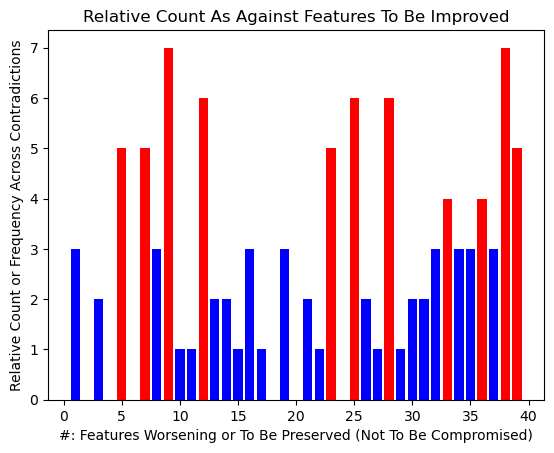
1/3 1/5 1/15 1/19 1/22 1/36 3/1 3/13 3/14 5/9 5/12 5/39 7/9 7/17 7/23 7/25 7/38 7/39 8/13 8/16 8/23 8/30 9/5 9/7 9/12 9/34 9/36 9/37 10/12 12/3 12/5 12/9 12/11 12/19 12/25 12/39 13/8 13/35 14/5 15/1 16/8 16/27 16/37 17/7 19/26 21/26 21/32 21/34 21/35 21/36 21/39 23/28 23/31 23/32 23/34 25/7 25/12 25/28 25/30 25/32 25/33 26/9 26/14 26/19 27/16 28/25 28/33 28/36 28/38 28/39 29/10 29/31 30/8 30/25 30/38 31/23 31/29 32/23 32/25 33/9 33/12 33/21 33/25 33/28 33/35 33/38 34/9 34/23 34/38 35/33 35/38 36/1 36/7 36/9 36/21 36/28 37/16 37/38 38/28 38/33 38/37 39/5 39/7 39/12 39/28
EXAMPLE: Archiving data refers to the process of storing and managing data for long-term retention, typically in a secure and cost-effective manner. It involves moving data that is no longer actively used or needed for regular operations to a separate storage location where it can be preserved and retrieved if necessary. Many industries have legal or regulatory requirements that mandate the retention of certain types of data for a specified period. Archiving ensures that organizations can comply with these regulations by storing data in a secure and accessible manner. Archiving allows organizations to store data in a manner that is both cost-effective and efficient, ensuring optimal resource utilization. Archiving solutions often include mechanisms to maintain data integrity over time, and they provide secure storage to protect against unauthorized access or data loss. Archiving systems are designed to handle large volumes of data, providing scalability to accommodate growing storage needs. Even though archived data is not actively used, it should be accessible when needed. Archiving solutions ensure that data can be retrieved reliably over the long term.
Contradictions (7/9, 13/8): Archiving data addresses several contradictions and challenges in information management, storage, and access: As data volumes grow, maintaining quick and efficient access to all data becomes challenging. Storing all data on active systems may lead to resource inefficiencies, but not preserving important historical or reference data poses risks. Traditional backups can be resource-intensive, and retaining extensive backups for extended periods may strain storage resources. Accumulation of large amounts of data can impact system performance, leading to slower operations. Archiving, by addressing these contradictions, contributes to a more efficient and effective approach to data management, enabling organizations to navigate the complex landscape of data storage, compliance, and access.
Solution: Primary storage (such as high-performance disk arrays) can be expensive, and storing large amounts of inactive or seldom-used data on this type of storage is not cost-effective. Archiving helps optimize primary storage by moving less frequently accessed data to lower-cost storage solutions, freeing up space for more critical and active data. Valuable historical or reference data may be at risk if stored only on active systems, especially in the face of accidental deletions, system failures, or cyber threats. Archiving ensures the preservation of important data, and by organizing it appropriately, allows for efficient retrieval when needed.
Over time, large amounts of data can accumulate and impact the performance of active systems and applications. rchiving helps maintain optimal system performance by offloading non-essential data, ensuring that active systems can operate efficiently. Traditional backups can be resource-intensive, especially when dealing with vast amounts of data. Archiving can complement backup strategies by separating data that doesn’t change often from the frequently changing data, reducing the time and resources required for backups.
Various IT storage archival systems work in different ways to address these challenges: Tape Archiving: Data is stored on magnetic tapes, providing a cost-effective, offline, and durable archival solution. Retrieval times may be slower compared to disk-based systems. Disk Archiving: Archiving on disk-based systems provides faster retrieval times compared to tape. Hierarchical Storage Management (HSM) systems automatically move data between high-performance disks and lower-cost storage tiers. Cloud Archiving: Organizations can use cloud services for archiving, leveraging scalable and cost-efficient storage solutions. Cloud providers often offer tiered storage options, allowing organizations to choose the most suitable storage class for their archived data.
Archiving allows organizations to move less frequently accessed data to lower-cost storage solutions, optimizing storage costs while maintaining performance for critical and active data. Archiving separates active and inactive data, ensuring that data that is not frequently accessed does not hinder the accessibility of more critical and actively used data. Archiving helps organizations meet compliance standards by securely retaining data for specified periods while optimizing storage resources. Archiving ensures the preservation of valuable data, balancing the need for resource efficiency with the requirement to retain critical information. Archiving systems implement secure storage practices, allowing organizations to strike a balance between restricting access to protect data and enabling controlled accessibility when needed. Archiving complements backup strategies by separating less dynamic archival data from frequently changing data, enhancing backup efficiency. Archiving helps maintain optimal system performance by offloading non-essential data, allowing active systems to operate efficiently. Long-term data preservation requires stable formats, but technology evolves, potentially leading to format obsolescence. Archiving systems may include mechanisms to address format changes or migrations, ensuring data remains accessible and readable over the long term.